How to find a WordPress backdoor and remove it
There is one scenario that repeats so often we recognize it before the person finishes the sentence. The site was infected. Someone cleaned it, or the owner deleted what looked suspicious. For a week or two everything was fine. Then it all came back, just like before.
In short: if the infection keeps coming back, there is almost always a backdoor or open entry. Find the spare entrance, close the hole, then watch the site for the next few days.
When an infection returns after cleanup, in nine out of ten cases the reason is the same: there is a WordPress backdoor nobody found. Cleanup removed what was visible and left what allowed the attacker to return whenever they wanted.
In this article we explain what a WordPress backdoor actually does, why it is hard to notice, where it most often hides, what it looks like when you open it, and in what order it makes sense to search for it.
What a backdoor actually does
The easiest comparison is a key. Imagine someone takes your apartment key, makes a copy, and returns the original so you never notice it was missing. You can change the lock on the front door as many times as you want. The copy still opens a side door you forgot existed.

Technically, every backdoor is a file that accepts commands from outside and executes them on your server. Some are literally a few lines of code: they take content from one parameter in the URL and run it. Others are more elaborate, with their own password and an interface that looks like a real file manager, available only to whoever knows the exact path.
What ties them all together is that the access they give you does not depend on anything you control from the WordPress admin. You can change the password, turn on two-factor login, delete a suspicious admin account you noticed. If the backdoor file still sits somewhere on the server, the attacker still gets in when they want.
This is the difference many people miss at the first encounter with an infection. Removing visible consequences (spam content, a strange redirect, a suspicious user) is not the same as removing the cause.
Why it is hard to notice
An average WordPress install has several thousand files. Core, theme, dozens of plugins, each with its own folder structure. Nobody realistically opens every file to see what is in it. Attackers know that and write code to survive exactly the kind of check you are likely to do.
The name looks as if it belongs to the system
Instead of an obvious name, such a file is often called something like wp-cache-config.php, class-wp-utils.php, or admin-functions-backup.php. When you skim a file list, such a name raises no suspicion.
The code is deliberately unreadable
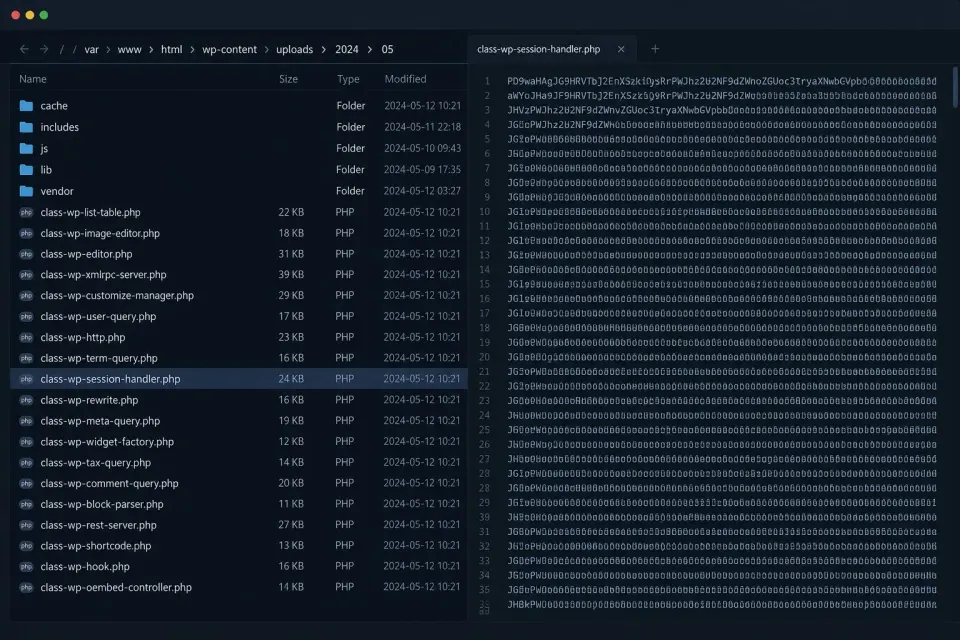
The contents are often written so they only decode at execution time. If you open such a file, you will see a long string of letters and numbers without a single recognizable word. That is both a way to hide and the most reliable sign that something is wrong, because legitimate code has no reason to be unreadable.
The modification date is faked
A common first reflex is to sort the folder by modification date and look at what was added most recently. Attackers expect that, so they sometimes set the file date to match surrounding legitimate files. That trail then disappears.
The file does nothing until it gets the right call
A more sophisticated backdoor does not react until it receives a specific password or parameter. If you only open it in the browser, it shows a blank page or an error and looks harmless. It is simply waiting for the call that only the person who planted it knows.
It was injected into an existing, legitimate file
This is the hardest variant. There is no new file that would catch the eye. There is only one extra line in a file that belongs there, often at the very end, after many blank lines, outside what you see without scrolling.
Where it most often hides
A few locations repeat from case to case, and each has its own reason.
Uploads folder
The folder wp-content/uploads is meant for images and documents. A file with the .php extension should never be there. Attackers like it precisely because most people never think to look for executable code there, since "there is no code there anyway".
MU-plugins
The folder wp-content/mu-plugins is loaded by WordPress automatically, before all other plugins. Its contents do not appear in the plugins list the same way ordinary plugins do, and a large number of site owners do not even know that folder exists. An ideal place for something that needs to run quietly and survive the removal of everything else.
Inside the theme or a plugin
Either as a separate file among dozens that already exist, or as an extra line in a file that already belongs there. Especially often used is the functions.php file of the active theme, because it loads on every page.
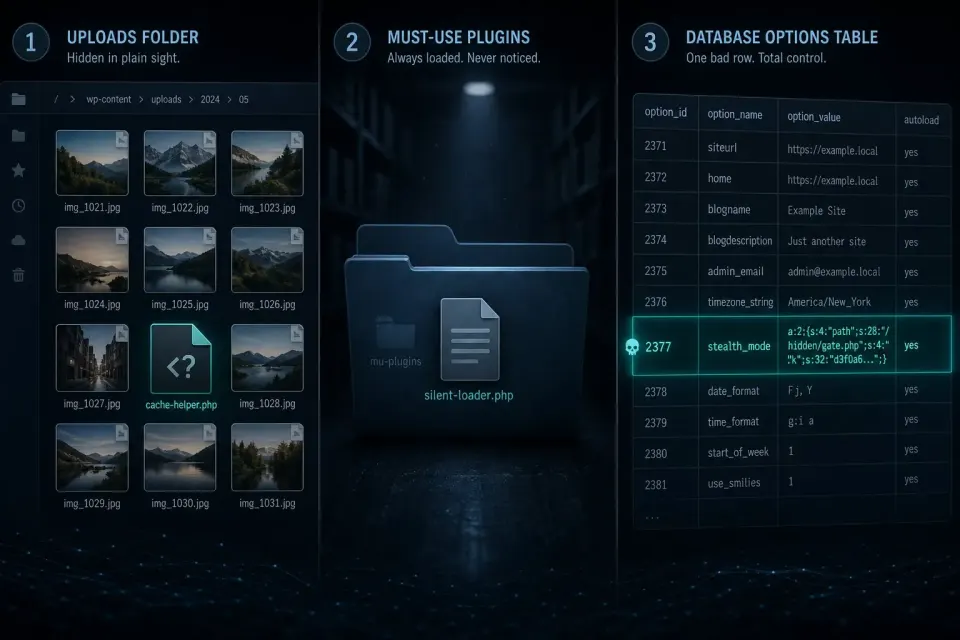
In the database
This place is most often overlooked, because it is not a file. Code can be written into the wp_options table, in fields loaded on every request. If you clean only files, everything comes back as soon as the page opens again.
As a scheduled task
An attacker can schedule a WordPress task that reinstalls the backdoor a few days after deletion. This explains cases where the owner deletes the file and the file returns on its own.
As a hidden admin account
It is not a file, but it works on the same principle. An extra account with admin rights, often with a name that looks systemic, gives access even after all password changes.
Why a normal plugin check is not enough
The usual reflex when infection is suspected is to open the list of installed plugins and delete what looks suspicious. The problem is that a backdoor almost never exists as a separate, named plugin in that list.
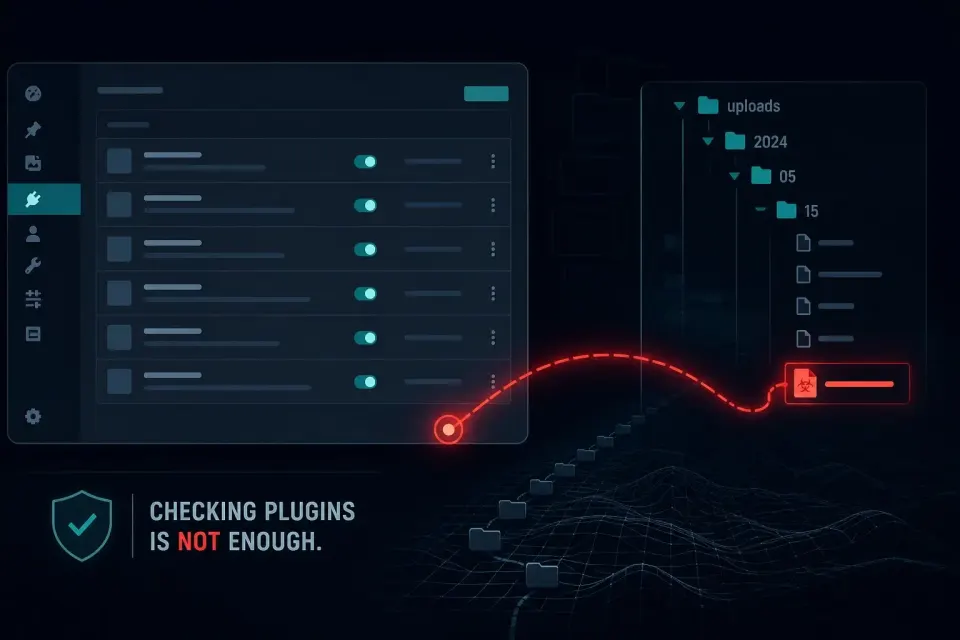
A file planted in the uploads folder will never appear there, because WordPress builds that list from folder structure and file headers that a backdoor deliberately lacks. The same applies to code injected inside a legitimate plugin you have no reason to suspect.
That is why the scenario from the introduction of this article looks as if it has no explanation. The owner deletes a few plugins, the site temporarily looks clean, then everything returns. The real entry was never touched.
How a backdoor is actually found
Since manually reviewing thousands of files is not feasible, reliable searching rests on three approaches that work together.
Comparison with official versions
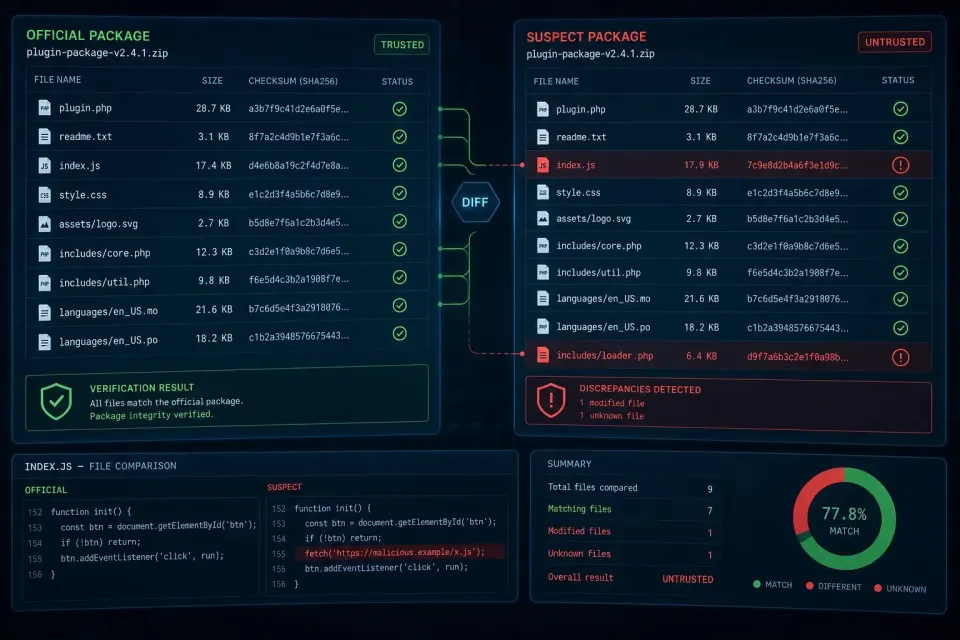
WordPress core and every plugin from the official repository have a known, publicly available version. Comparing the files on the site with that version immediately shows two things: which existing file was changed, and which file does not belong to that package at all. This does not depend on recognizing content, so it catches completely new patterns nobody knows yet.
Checking places where executable code should not be
Every PHP file in the uploads folder is suspicious by definition, regardless of name and content. The same applies to unexpected files in the mu-plugins folder. This check is simple and in practice extremely effective.
Recognizing patterns in the code
There are combinations of functions that practically never appear in legitimate WordPress code and that are typical of malicious code. Their presence is almost always a reliable signal, even when you do not understand what the decoded content actually does.
All three checks together, done automatically and on a schedule, give a far more reliable result than any one-off manual check. Simply because the volume of work (thousands of files on every scan) is something that cannot be done by hand.
What a typical case looks like from start to finish
To make the whole story more concrete, here is the sequence that repeats in practice with small variations.
An automated script finds a vulnerability in a plugin that has not been updated for several months. Through it, it plants a backdoor file in the uploads folder. That is the first step, and at that moment nothing is visible from outside. The site works normally, speed is the same, there is not a single sign.
A few days later, through that backdoor, what actually brings the attacker money is inserted: spam content, visitor redirects, or a mail-sending script. That is the first moment the site owner notices something, most often through someone else's report or a warning in search.
The owner reacts to what they see. They update the vulnerable plugin, which closes the original hole. They change the password. They manually delete spam pages. The site looks tidy again and seems resolved.
The backdoor file from the first step nobody even looked for, because nobody knew it existed. Weeks pass. Then, without any new attack, everything returns. Sometimes because the attacker runs the same campaign again, sometimes because access was sold to someone else in the meantime.
The owner at that point concludes that cleanup does not work, or that the host is to blame, or that the site is "cursed". None of that is true. The problem was never solved. It only temporarily stopped being visible.
How long a backdoor can sit unnoticed
The answer people usually do not expect is: as long as it needs to. There is no mechanism that would discover it on its own.
Unlike spam or a redirect, a backdoor by itself produces no visible effect. It does not slow the site because it does not execute until someone calls it. It does not change content. It does not send anything. It does not appear in search. It does not consume resources the host would notice.

That means a site can look perfectly tidy for months while access still exists. We have seen cases where a file was planted a year before it was used, simply because that suited the attacker.
The practical consequence is that the absence of symptoms is not proof that there is no problem. That is also why monitoring makes sense even when everything is quiet, because it is precisely in those quiet periods that what later gets activated is planted.
What to do when you find it
First make a copy
A full copy of files and database before any change, even if infected. That is the only protection if something goes wrong, and the only data source for later reconstruction.
Look at the file before you delete it
Creation date and contents often tell you when it was planted and through which hole it entered. Without that you fix the symptom and wait for a repeat.
Ask how it got there
This is more important than the removal itself. If the original vulnerability stays open (outdated plugin, weak password, theme from an unofficial source), the next backdoor is only a matter of time.
Assume it is not the only one
Attackers as a rule leave more than one entry, because they expect the first to be found. When you find one, that is a reason to keep looking, not to stop.
Change every password
WordPress admin, database, hosting panel, FTP and SSH access. While the backdoor was active, the attacker could probably extract those credentials too, so treat them as compromised.
Invalidate existing sessions
Changing the password does not always invalidate already open sessions. If the attacker stole a login cookie and not only the password, they are still inside. Invalidating all active sessions closes that path too.
Watch the site for the next week
After cleanup it is worth monitoring more closely for at least seven to ten days. That is the period in which you most often see whether something was missed, because scheduled tasks and backup entries usually have delayed effect. If nothing surfaces in that window, the odds that the job is finished are much higher than on day one.
How to prevent it from happening again
The most reliable defense is not a one-off cleanup, but continuous monitoring. That follows directly from everything described above: a backdoor is deliberately built to pass through one manual check. The only way to catch it in time is something that regularly, automatically compares the current state of files and database with the previous one.
Alongside that go the basics that close most entries before they open at all. Regular updates of core, theme, and plugins. Removing everything unused, because an inactive plugin with a vulnerability is still vulnerable. Strong, unique passwords with two-factor login. Blocking PHP execution in the uploads folder at the server level, which makes an entire class of backdoor files stop working even if a file somehow gets planted.
How to check where you stand now
If you suspect a WordPress backdoor, or an infection has already returned once after cleanup, the first step does not have to cost anything. A free quick scan reviews the publicly available content of the site and looks for known malware patterns, hidden scripts, and suspicious redirects. No account, no installation, usually under a minute.
The limit of that check should be stated openly, because for this topic it is decisive. A remote check sees only what is publicly available over the internet. A backdoor that quietly sits in a file waiting for a call is not publicly visible, and such a check will as a rule not find it. A clean result is a good sign for the surface layer, but not proof that a backdoor does not exist.
For a reliable answer you need to look at the files and database on the site itself, because that is the only place where it lives. If you want that insight, or if the problem has already returned and you do not want to guess, write to us. Send the site address and a short description of what happened, and we will tell you what makes sense as a next step.